Should I Use 2.4GHz or 5GHz WiFi for IPTV on Firestick? (Complete Guide)
If you’ve ever sat down to watch IPTV on your Firestick and suddenly faced buffering, lag, or poor video quality, you’re not alone. Choosing the Best WiFi for IPTV is one of the most important factors for smooth streaming. One of the most overlooked reasons behind these issues is your WiFi band—specifically whether you’re using 2.4GHz or 5GHz.
At first glance, it might seem like a small technical detail, but selecting the Best WiFi for IPTV can make a huge difference in streaming quality. The choice between these two frequencies directly affects speed, stability, and overall performance.
Finding the Best WiFi for IPTV isn’t about picking the fastest option every time. It depends on your setup, environment, and how you use your Firestick. In some cases, 5GHz may be the Best WiFi for IPTV, while in others, 2.4GHz might provide better range and consistency.
This guide will help you choose the Best WiFi for IPTV by breaking everything down in a simple, practical way so you can optimize your Firestick streaming experience.
Understanding 2.4GHz and 5GHz WiFi
Before deciding which one to use, it helps to understand what these bands actually do.
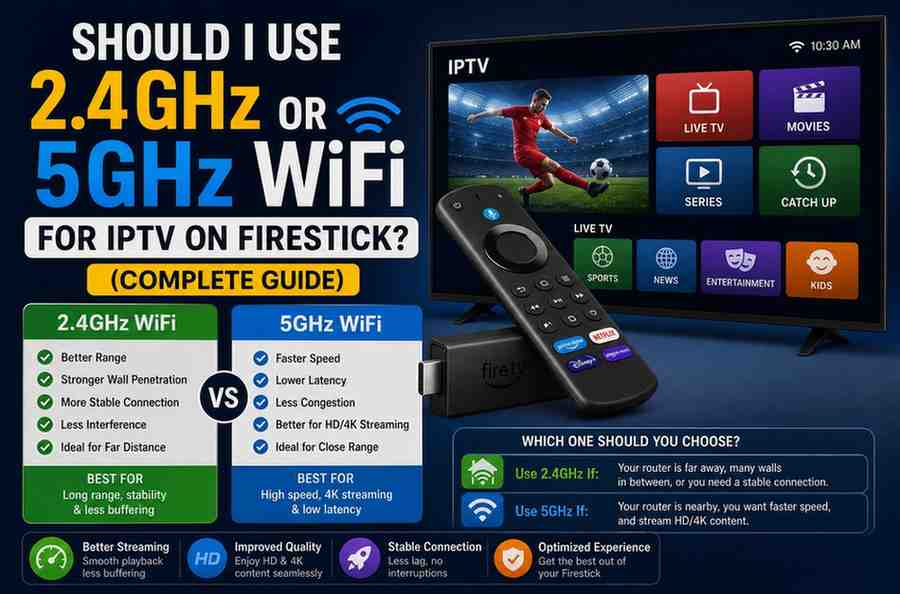
2.4GHz WiFi
This is the older and more widely used frequency band. It offers:
- Longer range
- Better wall penetration
- Wider device compatibility
But it comes with downsides:
- Slower speeds
- More interference from other devices
5GHz WiFi
This is the newer, faster option. It provides:
- Higher speeds
- Lower latency
- Less interference
However:
- Shorter range
- Struggles through walls and obstacles
Why WiFi Band Matters for IPTV
IPTV streaming is different from casual browsing. It requires a steady, consistent flow of data in real time. Even small interruptions can lead to:
- Buffering
- Pixelation
- Audio sync issues
- Stream drops
That’s why your WiFi connection—especially the band you choose—plays such a critical role.
2.4GHz for IPTV: When It Works Best
2.4GHz isn’t outdated—it’s just different. In some situations, it can actually outperform 5GHz.
Best for Longer Distances
If your Firestick is far from your router, 2.4GHz is often more reliable. It maintains signal strength over distance better than 5GHz.
Better Through Walls
Living in a house with multiple rooms or thick walls? 2.4GHz can penetrate obstacles more effectively.
Stable (But Slower) Connection
While speeds are lower, the connection can be more stable in certain environments.
When to Choose 2.4GHz
- Router is in another room
- Signal strength is weak on 5GHz
- You experience frequent disconnects on 5GHz
5GHz for IPTV: When It’s the Better Choice
If your setup allows it, 5GHz is usually the superior option for IPTV.
Faster Speeds
Higher bandwidth means smoother streaming, especially for HD and 4K content.
Lower Latency
Less delay results in quicker channel switching and better real-time playback.
Less Interference
Since fewer devices use 5GHz, you’re less likely to experience signal congestion.
When to Choose 5GHz
- Firestick is close to the router
- You stream in HD or 4K
- Your home has many connected devices
- You want the smoothest possible experience
Speed vs Stability: The Real Trade-Off
Here’s where things get interesting.
- 2.4GHz = Stability + Range
- 5GHz = Speed + Performance
For IPTV, both matter. A fast but unstable connection will buffer. A stable but slow connection may struggle with high-quality streams.
The goal is to find the balance that works best in your home.
How Distance Affects Your Choice
Distance is one of the biggest deciding factors.
Close to Router (Same Room)
Go with 5GHz. You’ll get maximum speed and performance.
Moderate Distance (1–2 Rooms Away)
Test both. If 5GHz signal is strong, use it. Otherwise, switch to 2.4GHz.
Far from Router
2.4GHz is usually the safer option.
Impact of Walls and Obstacles
Physical barriers weaken WiFi signals—especially 5GHz.
Common obstacles include:
- Concrete walls
- Metal structures
- Large furniture
- Floors in multi-story homes
If your Firestick is behind several obstacles, 2.4GHz may provide a more consistent connection.
Does 5GHz Always Mean Better IPTV Quality?
Not necessarily.
If your 5GHz signal is weak, you might experience:
- Random buffering
- Sudden drops
- Lower actual speeds
In that case, a strong 2.4GHz connection can outperform a weak 5GHz one.
How to Check Which Band You’re Using
On your Firestick:
- Go to Settings
- Select Network
- Look at your connected WiFi name
Many routers label bands like:
- “HomeWiFi_2.4”
- “HomeWiFi_5G”
If not, you may need to check your router settings.
Tips to Optimize WiFi for IPTV on Firestick
Regardless of the band you choose, these tips can significantly improve performance.
1. Place Your Router Strategically
Keep it in a central, open location—not hidden behind furniture.
2. Reduce Interference
Avoid placing the router near:
- Microwaves
- Cordless phones
- Bluetooth devices
3. Use a Dual-Band Router
This allows you to switch between 2.4GHz and 5GHz as needed.
4. Upgrade Your Router
Older routers may struggle with modern streaming demands.
5. Restart Your Devices
A simple reboot can fix temporary issues.
What About Internet Speed?
Your WiFi band won’t matter much if your internet speed is too low.
Recommended speeds for IPTV:
- SD streaming: 5–10 Mbps
- HD streaming: 10–20 Mbps
- 4K streaming: 25+ Mbps
Even the best WiFi setup can’t compensate for insufficient internet speed.
Real-Life Scenario
Let’s say you’re watching IPTV in your living room.
Scenario 1: Router Nearby
You connect to 5GHz:
- Channels load instantly
- No buffering
- Smooth HD playback
Scenario 2: Router Upstairs
You connect to 5GHz:
- Signal drops
- Buffering occurs
Switch to 2.4GHz:
- Slightly slower, but stable
- Fewer interruptions
This is why testing both bands is so important.
Common Mistakes to Avoid
1. Always Assuming 5GHz Is Better
It’s better only when the signal is strong.
2. Ignoring Signal Strength
Speed doesn’t matter if the connection keeps dropping.
3. Overloading Your Network
Too many devices can slow everything down—especially on 2.4GHz.
Should You Use Ethernet Instead?
If you want the best possible IPTV experience, a wired connection is unbeatable.
Using an Ethernet adapter with your Firestick:
- Eliminates WiFi interference
- Provides consistent speeds
- Reduces buffering
It’s not always convenient, but it’s the most reliable option.
Final Verdict: Which One Should You Use?
There’s no one-size-fits-all answer, but here’s a simple rule:
- Use 5GHz if your Firestick is close to the router and signal is strong
- Use 2.4GHz if you’re farther away or dealing with obstacles
If you’re unsure, test both and see which gives you smoother streaming.
Conclusion
Choosing between 2.4GHz and 5GHz for IPTV on Firestick isn’t about picking the “best” option—it’s about picking the right one for your setup.
5GHz offers speed and performance, making it ideal for high-quality streaming. On the other hand, 2.4GHz provides better range and stability, which can be crucial in larger or more complex homes.
The key is to understand your environment, test both options, and optimize your setup accordingly. Once you do, you’ll notice a clear improvement in your IPTV experience—fewer interruptions, smoother playback, and a much more enjoyable viewing session.