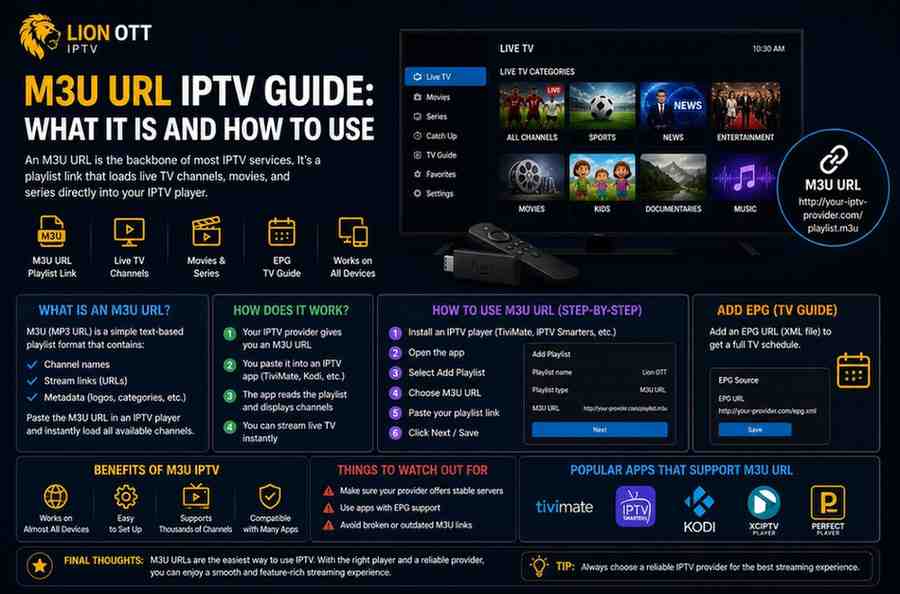
M3U URL IPTV Guide: What It Is and How to Use
If you’ve spent even a little time exploring IPTV, you’ve probably come across the term “M3U URL.” At first glance, it can look confusing—just a long string of characters that doesn’t seem to mean much. But in reality, it’s one of the most important parts of how IPTV works, which is why following an M3U URL IPTV guide can make things much clearer.
Understanding what an M3U URL is and how to use it can completely change your streaming experience. It gives you flexibility, control, and access to content in a way that traditional cable never could, especially when you rely on a proper M3U URL IPTV guide.
This M3U URL IPTV guide will walk you through everything in a simple, practical way—no technical background required.
What Is an M3U URL?
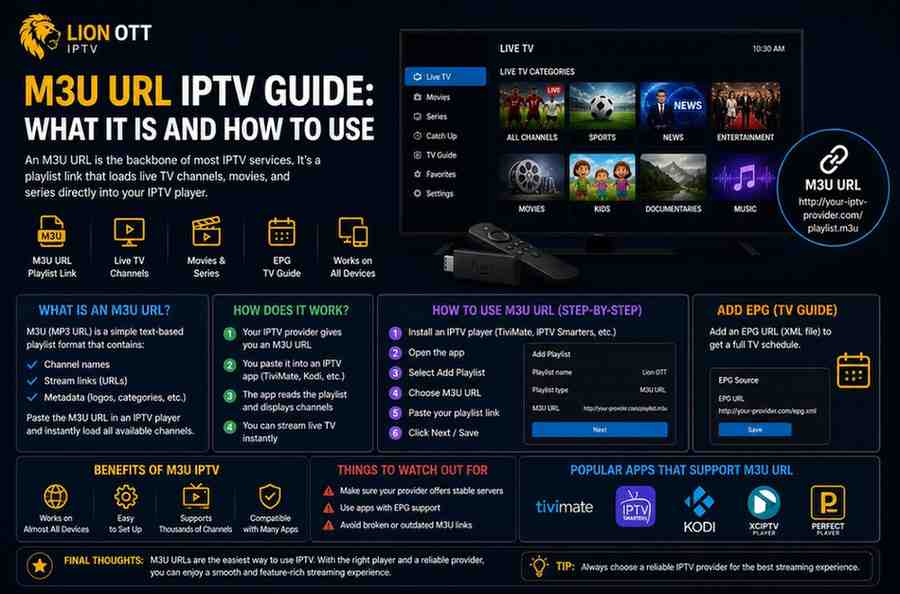
An M3U URL is essentially a playlist link used by IPTV services. Instead of storing channels directly on your device, the URL points to a file hosted online that contains a list of media streams.
Think of it like a digital channel list.
When you open an M3U URL in a compatible player, it loads:
- Live TV channels
- Movies
- TV series
- Radio streams
All of this content is organized in a format your IPTV app can understand.
In simple terms, an M3U URL acts as a bridge between your IPTV provider and your device.
How Does an M3U URL Work?
Behind the scenes, an M3U file is just a text-based playlist. It contains links to media streams, along with some basic information like channel names and categories.
When you paste the M3U URL into an IPTV player:
- The app connects to the server
- It reads the playlist file
- It displays available channels and content
- You select what you want to watch
All of this happens within seconds.
This is why a stable and well-maintained M3U URL is so important. If the server is slow or unreliable, your streaming experience will suffer.
Types of M3U Files
There are two main types you’ll encounter:
1. Static M3U File
This is a downloadable file saved on your device. It doesn’t update automatically, so you’ll need to replace it manually if changes occur.
2. M3U URL (Dynamic Playlist)
This is the more common option. It’s hosted online and updates automatically whenever the provider makes changes.
Most modern IPTV services use dynamic M3U URLs because they’re easier to manage and keep updated.
Why M3U URLs Are Popular in IPTV
There’s a reason almost every IPTV service relies on M3U URLs.
They offer:
Flexibility
You can use the same URL across multiple devices.
Easy Setup
No complicated installation—just paste the link.
Automatic Updates
Channels and content update without manual effort.
Wide Compatibility
Works with many IPTV apps and platforms.
This simplicity is what makes the M3U URL IPTV guide so relevant for beginners and experienced users alike.
How to Use an M3U URL
Using an M3U URL is easier than it sounds. Here’s a step-by-step breakdown.
Step 1: Get Your M3U URL
Your IPTV provider will give you a link after you subscribe. It usually looks something like:
http://example.com/get.php?username=xxx&password=xxx&type=m3u
Keep this link safe—it’s your access point.
Step 2: Choose an IPTV Player
You’ll need an app that supports M3U playlists. Some popular options include:
- VLC Media Player
- IPTV Smarters
- TiviMate
- GSE Smart IPTV
Choose one based on your device and preferences.
Step 3: Add the M3U URL
Open your IPTV app and look for options like:
- “Add Playlist”
- “Load M3U URL”
- “Add Source”
Paste your M3U URL into the field and confirm.
Step 4: Wait for Channels to Load
The app will fetch data from the server. This can take a few seconds to a minute depending on the size of the playlist.
Once loaded, you’ll see:
- Channel categories
- Live TV listings
- VOD content
Step 5: Start Watching
Select a channel or show and start streaming.
That’s it—you’re set up.
Best Devices for Using M3U URLs
One of the biggest advantages of IPTV is device flexibility.
You can use M3U URLs on:
Smart TVs
Many apps are available directly on Android TVs.
Streaming Devices
Firestick and similar devices work smoothly with IPTV apps.
Smartphones
Both Android and iOS support IPTV players.
Computers
VLC Media Player is a simple and reliable option.
Each device offers a slightly different experience, so choose what works best for you.
Common Issues and How to Fix Them
Even though M3U URLs are simple, you might run into issues.
Buffering
- Check your internet speed
- Restart your router
- Try a different channel
Playlist Not Loading
- Verify the URL is correct
- Check if your subscription is active
- Restart the app
Missing Channels
- Refresh the playlist
- Contact your provider
Most problems are easy to fix with basic troubleshooting.
Tips for Better Streaming Experience
To get the most out of your IPTV setup:
Use a Stable Internet Connection
Wired connections are usually more reliable than Wi-Fi.
Keep Your App Updated
Updates often fix bugs and improve performance.
Avoid Overloading Devices
Close unnecessary apps running in the background.
Choose a Reliable Provider
The quality of your M3U URL depends heavily on your provider.
Is Using an M3U URL Safe?
M3U URLs themselves are just playlist links—they’re not dangerous on their own.
However, safety depends on:
- The provider you choose
- The content you access
- Your online security practices
It’s always a good idea to:
- Use trusted IPTV services
- Avoid suspicious links
- Protect your connection when needed
M3U URL vs Xtream Codes
You might also hear about Xtream Codes login.
Here’s the difference:
M3U URL
- Simple link-based setup
- Works across many apps
- Easy to share
Xtream Codes
- Uses username, password, and server URL
- Often faster and more organized
- Better integration in some apps
Both methods achieve the same goal—streaming IPTV content.
When Should You Use an M3U URL?
An M3U URL is ideal if you want:
- Quick setup
- Cross-device compatibility
- Easy playlist management
It’s especially useful for beginners who want a straightforward way to start streaming.
Final Thoughts
Understanding how M3U URLs work gives you more control over your IPTV experience. Instead of relying on complicated setups, you can simply use a playlist link to access thousands of channels and on-demand content.
This M3U URL IPTV guide is designed to make things clear and practical, so you don’t feel overwhelmed by technical details.
At the end of the day, IPTV is all about convenience—and the M3U URL is what makes that convenience possible.
Once you know how to use it properly, streaming becomes smoother, faster, and far more enjoyable.